Understanding the Basics of Smart lock Technology
In today's technological world, Smart lock technology is quickly becoming a crucial part of modern security systems. As home automation grows, so does the importance of understanding how these intelligent devices work and the myriad benefits they can offer.
What is a Smart lock?
A smart lock is an innovative locking mechanism that allows users to secure and unlock their doors remotely through smartphone applications, keypads, or even voice-activated commands. Unlike traditional locks, which rely solely on mechanical keys, smart locks utilize wireless technology, typically Bluetooth or Wi-Fi, to grant or restrict access. This advancement not only enhances convenience but also increases security by allowing homeowners to monitor entries and exits from anywhere.
How Smart lock Operates
Smart locks operate through various means, including Bluetooth technology, Wi-Fi connectivity, or Z-Wave and Zigbee protocols. When a user approaches the lock, the system detects their smartphone or authorized device, enabling them to unlock the door without a physical key. Many smart locks also require users to create an account on a relevant application, providing additional layers of security and enabling features such as remote locking, unlocking, and access control management.
Benefits of Using a Smart lock
Integrating a smart lock into your home offers numerous benefits:
- Convenience: Eliminate the need for physical keys, allowing for easy access through smartphones or keypads.
- Remote Access: Control your lock from anywhere, provide temporary access to guests, and check real-time status.
- Enhanced Security: Get notifications upon door activity and create virtual keys for trusted friends and family.
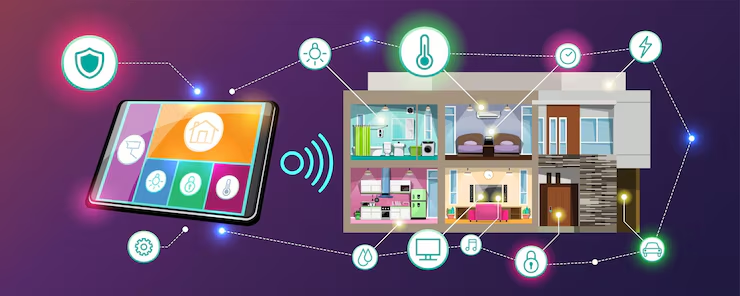
- Integration with Smart Homes: Syncs with other smart home devices to create more cohesive home automation.
Key Features to Consider in a Smart lock
Connectivity Options for Smart lock
When selecting a smart lock, consider the connectivity options it offers. Most smart locks connect via Bluetooth, which is great for close-range use, especially when you're nearby. Wi-Fi connectivity allows you to control and monitor your lock remotely but requires stable internet. Z-Wave and Zigbee are popular for home automation systems, ideal for users integrated with other smart home devices.
Security Features of Smart lock
Security should be your paramount consideration when choosing a smart lock. Look for features like two-factor authentication, auto-lock capabilities, and the presence of encryption protocols to protect your data. Some advanced locks even offer tamper alerts, allowing you to react quickly in case of unauthorized access attempts.
Design and Aesthetics of Smart lock
The design of a smart lock should blend seamlessly with your home while providing robust functionality. Look for options that complement your existing décor without compromising on technology. Many modern smart locks are designed to look sleek and contemporary, ensuring that security does not detract from your home’s aesthetic appeal.
Comparison of Popular Smart lock Options
Budget-Friendly Smart lock Choices
If you're looking to integrate smart lock technology without breaking the bank, several budget-friendly options are available. Prices for basic models can start low but offer essential functions such as remote unlocking and mobile access. These locks are ideal for first-time users exploring smart home technology.
Mid-Range Smart lock Features
Mid-range smart locks include advanced features like fingerprint recognition, data logging for access history, and compatibility with smart home systems. These locks strike a balance between affordability and high-tech options, making them perfect for users seeking more control.
Premium Smart lock Options
Premium models typically provide enhanced security measures, elegant designs, and comprehensive app features. Such locks often include integration with home automation ecosystems, enabling seamless operation with security cameras, alarms, and smart lighting. These premium models offer peace of mind at a higher price point.
Installing Your Smart lock Correctly
DIY vs Professional Installation
When it comes to installing a smart lock, you have two options: do it yourself (DIY) or hire a professional. DIY installations can be straightforward, with most smart locks designed to fit standard door frames easily. However, hiring a professional can ensure optimal security and that the lock integrates seamlessly with your existing home systems.
Steps for Installing a Smart lock
Follow these general steps for a successful installation:
- Gather all necessary tools and read the user manual carefully.
- Remove the existing lock by unscrewing it from the door.
- Install the smart lock according to the instructions, ensuring all parts fit snugly.
- Test the lock's functionality before securing any final components.
- Connect it to your smartphone app and configure your security settings.
Troubleshooting Installation Issues
Common installation issues can typically be resolved by double-checking measurements, ensuring proper alignment, or resetting the lock. If you encounter persistent problems, don’t hesitate to consult the user manual or reach out to customer support for guidance.
Maintaining and Upgrading Your Smart lock
Regular Maintenance Tips for Smart lock
Maintaining your smart lock is crucial for longevity and security. Perform regular updates on the lock’s firmware to ensure optimal security. Additionally, keep the locking mechanism clean and check the battery levels periodically, replacing batteries as needed. Cleaning the lock from dirt or debris will prevent operational issues.
When to Upgrade Your Smart lock
If your smart lock is several years old, it may be time for an upgrade due to evolving security threats and advancements in technology. Additionally, if you notice performance issues, unresponsive features, or compatibility with new smart home systems, consider upgrading.
Compatible Smart home Devices
Check for compatibility with other smart home devices when choosing a smart lock. Look for locks that work well with smart doorbells, surveillance cameras, and even voice-controlled assistants to create a fully automated home environment that synchronizes your security efforts.
Frequently Asked Questions (FAQs)
What is a smart lock?
A smart lock is a locking device that offers keyless entry through smartphone apps, keypads, or biometrics. It allows remote access control and monitoring.
How does a smart lock work?
Smart locks operate using wireless technologies like Bluetooth or Wi-Fi, allowing users to lock or unlock doors from a distance using compatible devices.
Do smart locks require Wi-Fi?
While some smart locks do not require Wi-Fi to function, Wi-Fi allows for remote access. Bluetooth locks work within a short range but typically do not require an internet connection.
Are smart locks safe?
Yes, smart locks can be safe if properly installed and maintained. Look for locks with encryption, alarms, and two-factor authentication for enhanced security.
Can I still use a traditional key with a smart lock?
Many smart locks come with backup key options, allowing users to unlock them with traditional keys in case of battery failure or technical issues.